Griple
Bringing Full Contact Chat to the Fans
Timeline
9 months
Skills Focus
Product Design
Systems Thinking
Usability Testing
Rapid Prototyping
Role
UX Design Lead


01 —
Situation
Griple set out to solve a problem sports fans already knew they had: watching a game alone strips out the best part, needling your friends in real time. Griple's answer was to use 3D avatars to bring trash talk, predictions, reactions, and enough physical comedy in the animations to make a dunk actually feel like one. I was the sole product designer on an eight-person team, working directly with a game designer and a Unity UI developer to turn that idea into something people could use on their phones.
— 02 —
Approach
There was no established pattern for this. Chat UX has decades of convention behind it. A 3D avatar layered on top of chat, built in a game engine and shipped as a mobile app, has almost none. My approach was to treat the avatar layer and the chat layer as one product from day one, test with real users as early as budget allowed, and judge every concept against four requirements: fun, clear, connected, and legible. A design only counted as viable if it held all four; losing any one of them, no matter how good the rest looked, meant killing it.
— 03
Results
The fix for our core issue of avatars and chat reading as two disconnected surfaces held up in a second round of testing: 9 of 10 users in a new cohort correctly identified who sent each message, up over 40% from initial testing. That result was strong enough to justify a big feature bet: TEA. This is an on-device model that reads message sentiment and drives matching avatar animation automatically. TEA has recently shipped and I’m tracking four KPIs to measure impact of the roll out.
Where the Avatar Meets Chat
Griple is built for young sports fans, bringing sports trash talk into a digital space. Our differentiator is that our interface is accessible enough to feel like a chat app while also borrowing the presence and expressiveness from the metaverse products that are out of reach for our target consumer. When I joined, that meant a flat, sequential list of messages with a name and thumbnail per message, similar to Slack or Discord. Avatars were rendered separately at the bottom of the screen, playing a small set of animations. Chat carried the whole experience; the avatars could animate but weren’t providing the impact.
The first round of user testing (five sessions, pulled from our public waitlist and friends-of-friends) surfaced a key problem directly. Testers enjoyed the avatar animations but didn't connect them to who triggered them; a common reaction was some version of "haha, that's so funny, who did that?" The players' behavior showed they weren't associating avatars in the 3D room with their owner, or with messages in the chat. The two surfaces read as separate and disconnected, challenging our core value proposition.
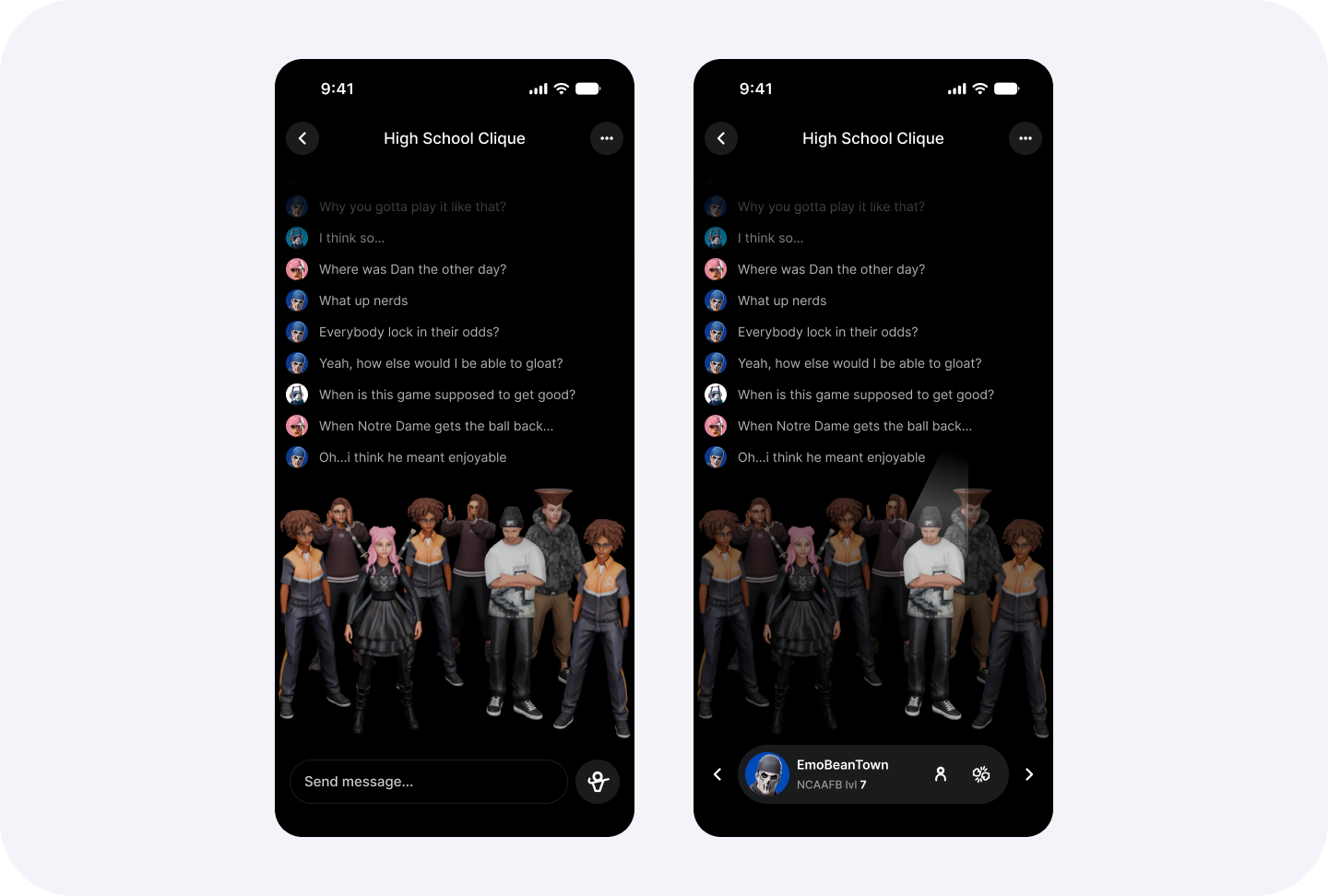
Original design before I joined the company. Chat needed more joy and connection with avatars
Merging the Surfaces
One early exploration reused a common gaming UI pattern: grid-based inventories. The idea is that as new messages are sent, they get dynamically fit into the smallest space they can occupy.
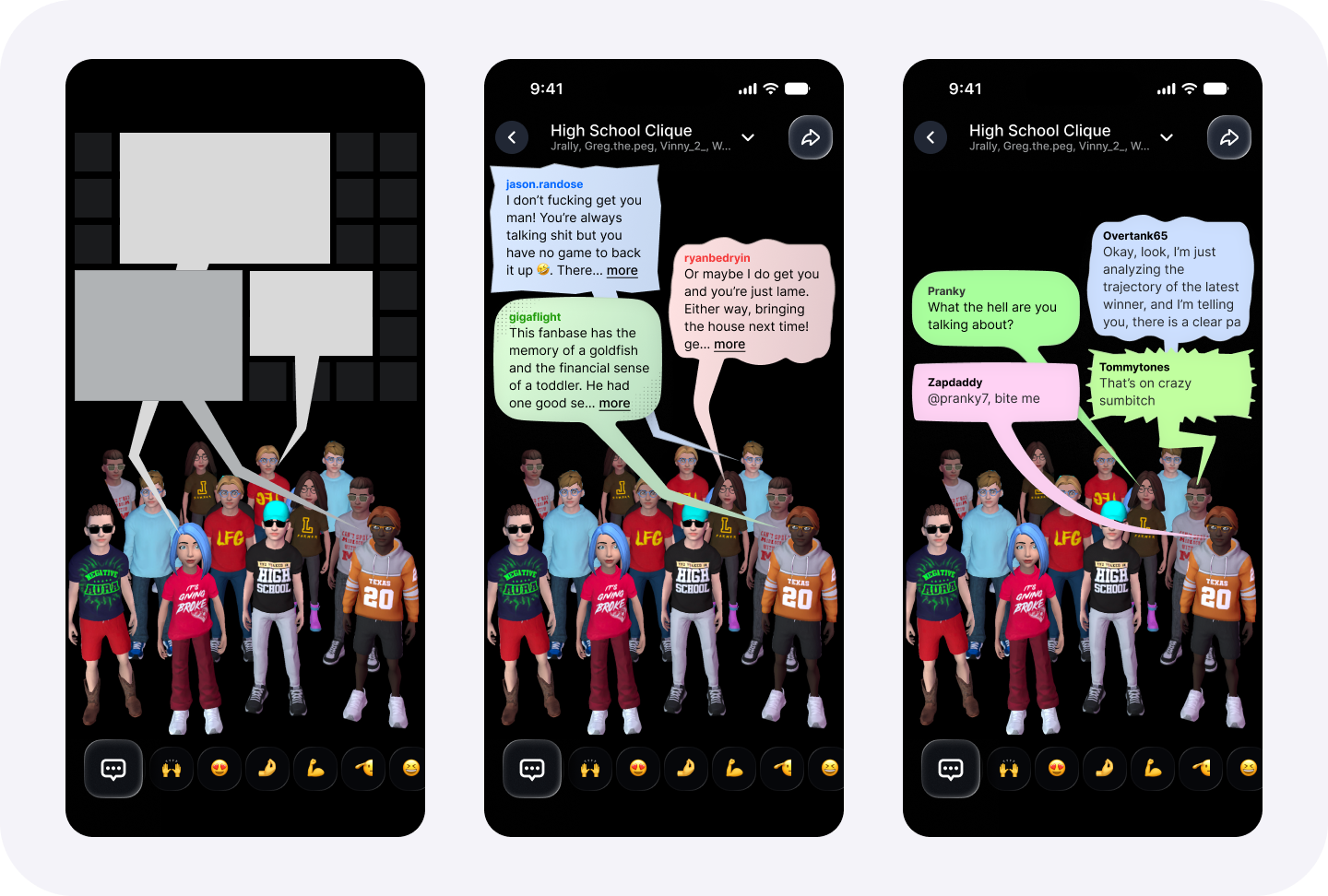
Benefits
Novel experience that leans into our differentiator
Allows a player to send a flurry of messages that capture that frenetic fun of sports
Chat feels full even if only a few messages get sent
Close connection between message and sender
Why it wasn’t right
Long messages feel much bigger and more important, encourages monologging and other negative play patterns
Clarity breaks when most messages come from avatars clustered in one area of the room
A question from our UI developer sparked the next attempt: what does "Full Contact Chat," the app's tagline, actually mean? I read it as physics. Each message became a rigid body that took up real space. Bubbles could have different effects.
Benefits
It’s fun; turns chat into a game
Allows for new interaction models: Normals bubbles bounce off each other, angry bubble could turn spiky and stick to another, laughing one could jiggle
Send action could impart momentum for nuanced control of messages
Why it wasn’t right
Rapid sequential messages were too difficult to read
Huge scope to maintain connection between moving avatars and physics based bubbles
Sequencing and replying were too difficult for play testers
What shipped instead was the synthesis of both failures: sequential, overlapping vertical bubbles for readability, each carrying a caret that pointed back to whoever sent it and elongated over time until the message timed out or scrolled off screen.
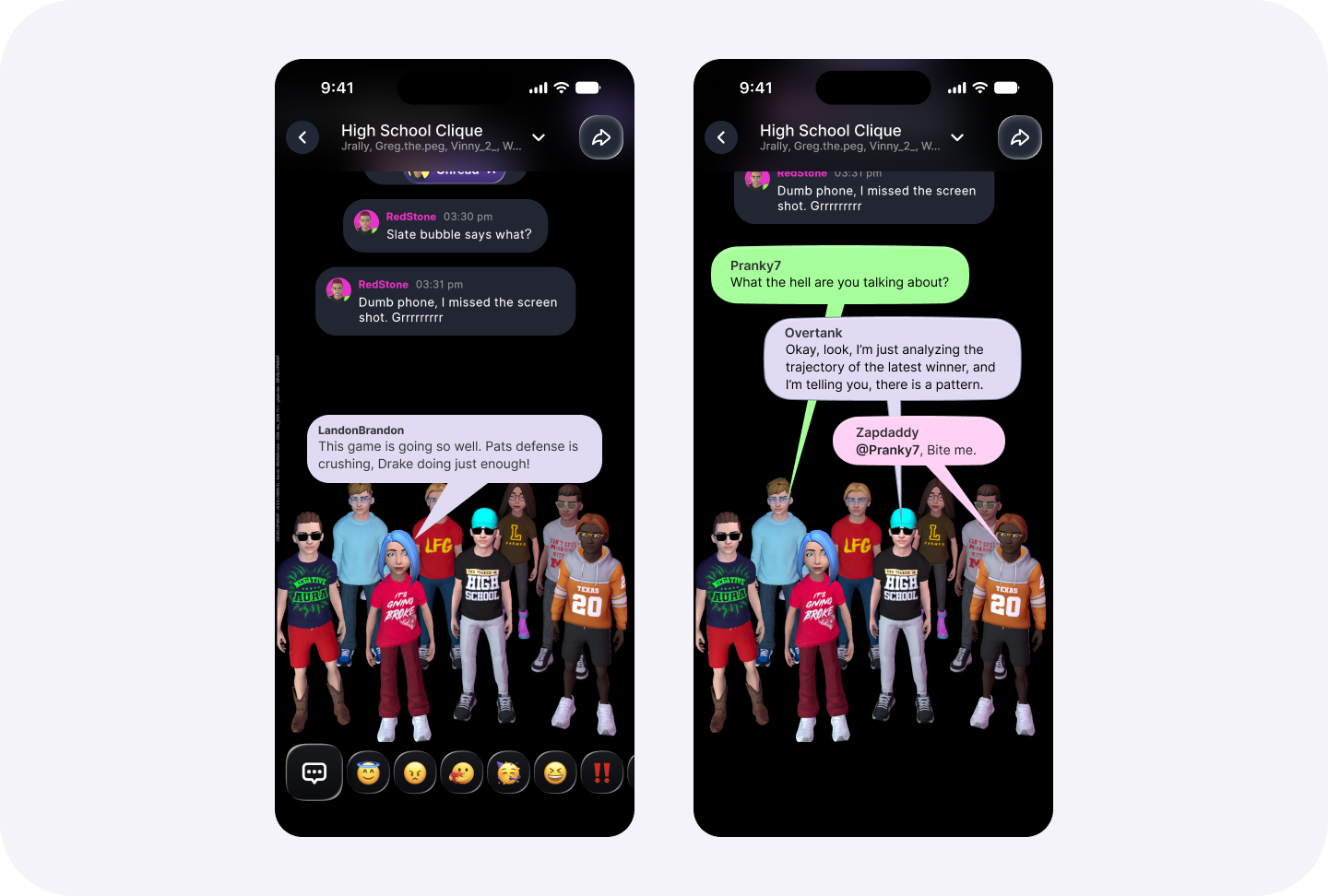
I ran a second round of testing with the new feature. Five sessions with two new users each: 9 of 10 correctly identifying who sent each message. The new cohort also had more fun with it than the first: we saw players run "revenge" animations, where one player's animation inspired an immediate comeback against the original antagonizer. The recognition was driving the exact behavior the app was built to foster.
Why we chose it
Maximizes clarity and sequencing
Facilitates easier replies and reactions
Aligns to avatar animations
Easiest to tweak and iterate on as we experiment to find the fun
Tradeoffs we accepted
Least differentiated from competitors
Required a transition between live and historical states
Multiple players with the same thumbnail color will sometimes clash
TEA: Text, Expression, Animation
That result set up our biggest pivot of the whole company. While this behavior was a strong indicator the app was moving in the right direction, it wasn’t differentiating us enough.
To break from a crowded pack of chat apps, the game designer pitched a new system he called TEA: Text, Expression, Animation. This system would pair every message with an animation and expression. The original proposal used a manual emotion picker, a wheel or selector the player would choose from before sending. I pushed back: messaging app users expect to send fast, with instant feedback, hundreds of times a session. A selection step at that frequency would go unused.
Instead I designed a system that selects the animation automatically from message sentiment, with a manual override available for anyone who wants to be deliberate or intentionally sarcastic. To drive the automatic side, the team built a small on-device model that reads sentiment and triggers a matching themed animation and bubble style, with no added friction; the room stays alive just from sending a message normally. TEA is built to recover what made the physics bubbles fun, inside the legible pattern testing had already proven worked.
Measuring Success
TEA has shipped, and the app remains available to test directly. Our current user base is small but I will be tracking these targets over the coming months to validate the success of the feature:
Average player send 2 more messages per week
Manual override used on fewer than 20% of messages
Improved D30 retention
At least 15% of existing users invite one more friend after trying TEA
Reflection
This was the first project where AI-assisted prototyping was viable inside my actual process, not just a novelty. Figma Make let me build a functional prototype of the physics bubbles in a single day, before costing a penny of engineering time. That changed how far I was willing to explore during a phase where almost nothing about the interaction had precedent. Now it's a tool I build into how I approach any concept this untested.